

SEO site architecture is how a site's pages are organized and linked so search engines can crawl them, understand each one, and tell which matter most. In practice it means grouping pages into topic clusters, giving each search intent one destination page, and linking pages the way their topics actually relate.
Why SEO is an architecture problem
BizCredX is where this clicked for me. I had research mapping dozens of real search questions to a 74-URL site. The obvious move was a page per question. The research pointed the other way: answer the questions inside the existing hubs, and use those answers as bridges to deeper guides, comparisons, and tools.
SEO doesn't create pages. Search questions reveal the relationships between pages.
A question about what business credit is belongs near the educational foundation. A question about which vendors report belongs near the vendor database. Search behavior was telling me how the product should be organized. The BizCredX story goes through it in detail.
This page is the search-engine side of website architecture. The human side, labels, journeys, and flows, is on UX and information architecture. In practice the two point the same way far more often than they conflict.
Structure the site by search intent
Every search has an intent behind it. The type of intent decides what kind of page should answer it. Matching those two is the first structural decision.
The mistake I see most is answering a comparative search with an informational page. When someone asks which Net-30 vendors report to which bureau, they don't want an essay. They want a table they can sort. When the question becomes which one, the format usually needs to change.
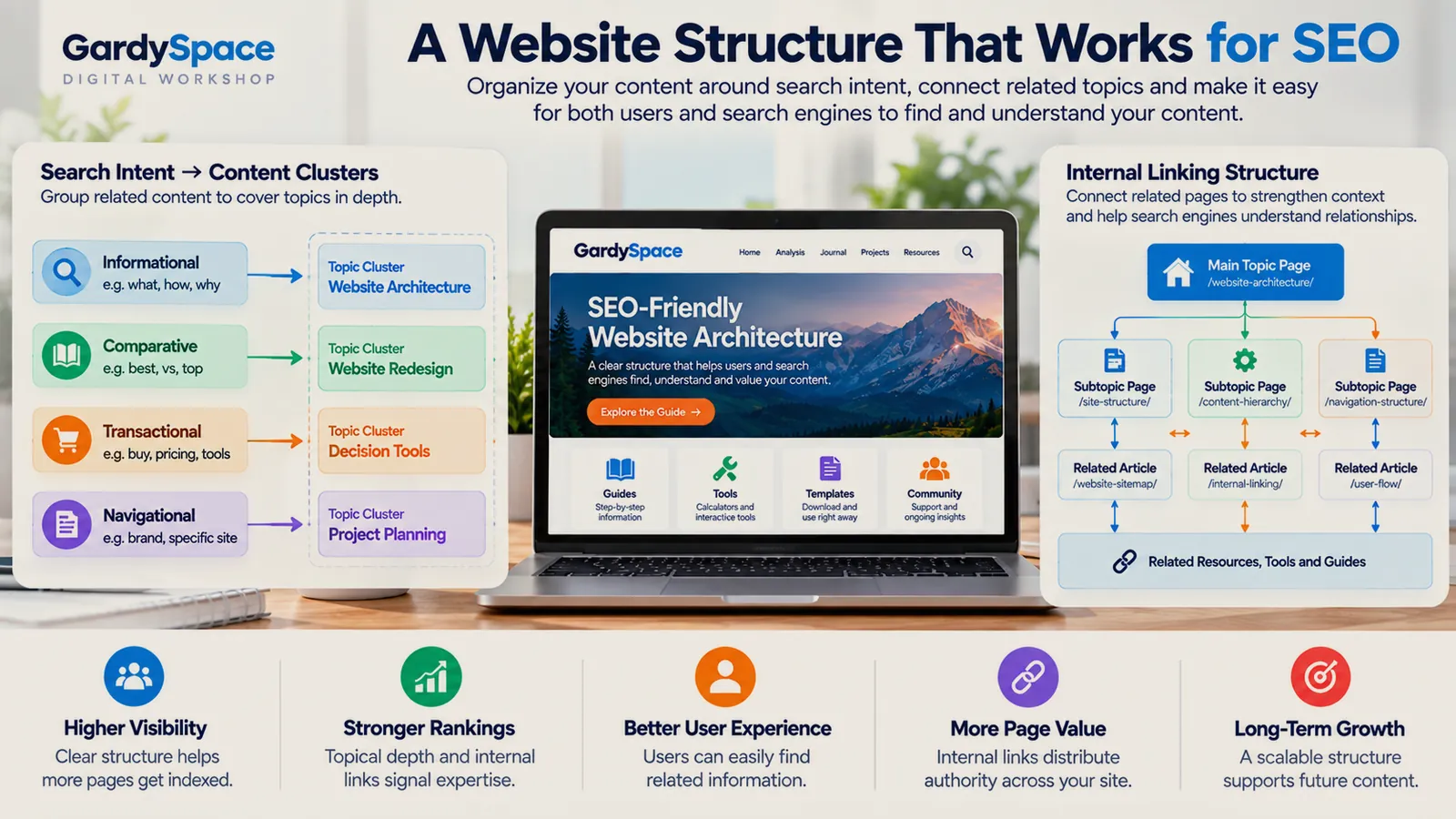
Topic clusters and content hubs
A topic cluster is a hub page plus the supporting pages around it. The hub covers the subject broadly and links to every supporting page. Each supporting page goes deep on one question and links back up.
HUB PAGE  (broad topic, one intent)
   │
   ├── Supporting page: question A ──┐
   │                                 │ cross-links where
   ├── Supporting page: question B ──┤ readers cross over
   │                                 │
   └── Supporting page: question C ──┘

Every supporting page links back up to the hub.
HSAMaxGuide works this way now. Instead of a separate page for every product someone searches, an OTC eligibility hub holds the products together and connects out to HSA versus FSA and the wider eligible-expenses guide. Tools belong inside clusters too. A contribution calculator is the natural next step from an article about contribution limits, not a page sitting alone in a tools folder.
One intent, one destination page
This is the rule that prevents keyword cannibalization. Closely related keywords reinforce one page instead of each getting their own. Here's the actual map behind this part of GardySpace, as an example:
Six destination pages carry dozens of keywords between them. Where two could plausibly overlap, like website information architecture, one page gets it as primary and the other links to it. The Journal and Analysis pages support these hubs with stories and lessons, but they don't compete for the same searches.
Internal linking architecture
Internal links are how both visitors and crawlers move through a cluster. The rules I follow:
- Hub to every child, every child to the hub. This is the spine of the cluster and shouldn't be left to chance.
- Link to the next question, not just the parent. An answer about a symptom should link to what it costs to fix, not only back to the category.
- Use descriptive anchor text. Link text should say what the destination is about. Click here tells a search engine nothing.
- Connect across clusters where readers cross. On FixRN, troubleshooting guides link to cost pages, cost pages link to local service, and state hubs link back into guides.
- Hunt orphans. Any page with no internal links pointing to it is invisible to visitors and weak for crawlers.
The best internal link usually isn't the one an SEO tool suggests. It's the page that answers the next question a reader is likely to have at that exact point.
Crawling and indexing: the technical foundation
None of the structure above matters if search engines can't reach it. This layer is invisible until it breaks, which is why it breaks quietly.
robots.txt allows the pages you want indexed. DryOutHub's low-value flag traced back to a site-wide block here.
XML sitemap lists every live page and gets resubmitted after structural changes.
Canonical tags point to one preferred URL when similar pages exist.
Absolute paths for assets and links, so URL rewrites don't break styles or navigation.
URLs that mirror the hierarchy, readable and stable once published.
Structured data that matches what's on the page: breadcrumbs, articles, FAQs.
One pattern worth knowing: when the same crawl problem shows up on several sites built from similar templates, it's rarely several bugs. It's usually one shared file, set wrong once and inherited everywhere. I wrote about finding exactly that.
Reading Search Console as architecture feedback
Search Console is usually treated as a report card. I've started treating it as a design tool. Two real snapshots:
Neither is a traffic success story, and I'm not presenting them as one. They're useful because of what they reveal. HSAMaxGuide was getting impressions for products I hadn't built pages around, which told me Google already connected the site to a wider cluster. That called for a hub, not fifty new pages. SavedNest's large Discovered, currently not indexed group pointed at internal linking into those pages, not at the content itself.
The questions I ask of every property's data: which queries show up that I didn't plan for, which pages trade places for the same query, and which sections sit unindexed. Each one is an architectural answer waiting to be found. These snapshots are from September 2026 and aren't a statement of current performance.
The full HSAMaxGuide follow-up, including the title fixes, the www duplicate behind 12 unindexed pages, and the honest AdSense math, is in 8,739 impressions, 13 clicks, and why AdSense was never the problem.
SEO site architecture checklist
Every page has one primary search intent, written down.
No two pages target the same intent.
Every cluster has a hub that links to all its children.
No orphan pages.
robots.txt, sitemap, and canonicals verified on the live domain.
Search Console reviewed for unplanned queries and unindexed sections.
The method as a guide with worksheets: question clustering, a keyword-to-page map, a cannibalization check, linking worksheets, and a one-page architecture canvas. Printable and fillable PDF, $33.
Get it for $33See all five products
Sold through the IGNE Publishing shop, my business entity.
See it in real projects
Each of these is shaped by search data as much as by the original plan.
HSAMaxGuide
Turn individual HSA questions into a connected information system that helps visitors move from an answer to the next useful decision.
View the projectBizCredX
Make a business-focused property easy to search, scan, and navigate.
View the projectSavedNest
Organize a consumer-facing decision experience around real questions rather than isolated articles.
View the projectFIXRN
Make service information actionable instead of leaving visitors at generic articles.
View the projectSEO site architecture FAQ
What is SEO site architecture?
SEO site architecture is how a website's pages are organized and linked so search engines can crawl them, understand what each one is about, and tell which pages matter most. It covers hierarchy, topic clusters, URL structure, internal linking, and the technical files that control crawling.
Why does site structure matter for SEO?
Search engines discover pages by following links and judge importance partly by how a site links to its own pages. A clear structure gets more pages found and indexed, concentrates authority on the pages that deserve it, and stops your own pages from competing with each other.
What is a topic cluster?
A topic cluster is a group of pages built around one subject: a hub page that covers the topic broadly, and supporting pages that go deep on specific questions. The hub links to every supporting page, and the supporting pages link back to the hub and to each other where it helps the reader.
What is keyword cannibalization?
Keyword cannibalization happens when two or more pages on the same site target the same search intent. Search engines have to guess which one to show, and often rank neither well. The fix is one primary page per intent, with overlapping pages merged or given a clearly different job.
How many internal links should a page have?
There's no magic number. Every page should link to its hub, to the next question a reader is likely to have, and to any related tool or comparison. If a link wouldn't help a reader at that point in the page, it probably isn't helping SEO either.
What does "Discovered, currently not indexed" mean?
It means Google knows the URL exists but hasn't added it to the index yet. On newer or larger sites it often points to weak internal linking, pages that look too similar to others, or crawl budget being spent elsewhere. Strengthening the links into those pages is usually the first thing to try.
Worth thinking about
- Is there a query in your Search Console that you never planned a page for? What cluster is it telling you exists?
- Which two pages on your site are most likely competing with each other right now?
Page history
- Linked the HSAMaxGuide search-data follow-up from the Search Console section.
- The companion product is now available through the IGNE Publishing shop.
- First published: search intent mapping, topic clusters, keyword-to-page map, internal linking rules, crawl and index checks, Search Console feedback, and FAQ.
Getting impressions but not clicks, or pages that won't index? That's usually a structure problem, and it's one I like working through.
Work with Gardy